
Offline crx install
Use this when the add-on stores are unavailable, or when you need to pin a specific version. It also works for 360, Quark and other Chromium-based browsers.
Download the crx file
- From the WuCai website: download the crx file (the link is permanent)
- From Baidu Netdisk: open the share, code
p66h
Scan the QR code to download it on a phone:

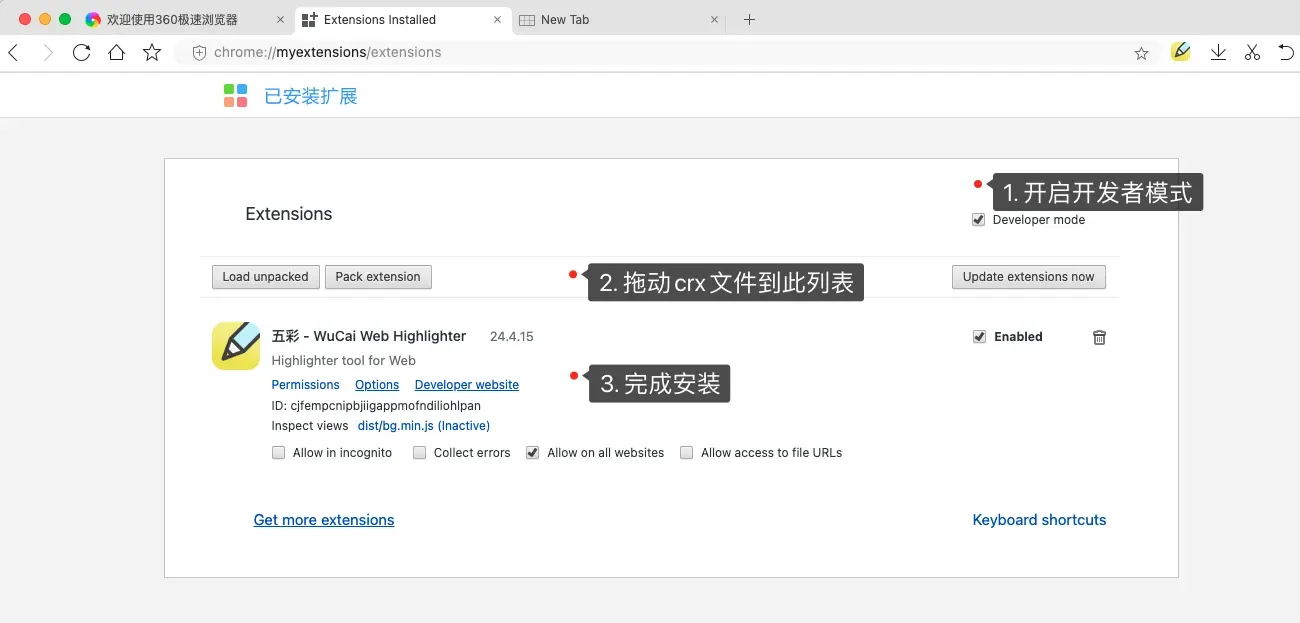
Install the crx file
- Open your browser's extension manager and turn on developer mode
- Drag the crx file into the extensions page
Avoid duplicates
If WuCai is already installed, remove the old copy first — two copies running at once will conflict.
Updating an offline install
An offline install does not update by itself. Remove the old version and install the new crx file to upgrade.