
WuCai Obsidian templates
Hello, friend of WuCai.
WuCai syncs to Obsidian, SiYuan, Logseq and Workflowy. What it syncs: highlights, annotations, page notes and full-text clips. Templates let you control how they are written.
Below is the default template, plus templates contributed by users. If you want to write your own, follow the walkthrough at the end.
Property labels in these examples are translated for readability — you can name them whatever you like.
Default template
- Name: Simple
- Author: WuCai Team
- Link: WuCai website
---
title: "{{title}}"
noteid: {{noteid}}
notetype: {{notetype}}
star: {{isstar}}
tags: {{mergedtags}}
{% if not isdailynote %}
domain: {{domain}}
domain2: {{domain2}}
author: "{{author}}"
source: "{{url}}"
{% endif %}
wucai: "{{wucaiurl}}"
highlights: {{highlightcount}}
created: {{createat}}
updated: {{updateat}}
---

## {{title}}

## Page note
{% block pagenote %}
{{pagenote}}
{% endblock %}

{% block highlights %}
{% if isdailynote  %}
## Daily note
{{ highlights | style_dailynote }}
{% else %}
## Highlights
{% for item in highlights %}
{{ item | style1({prefix:"> ", anno:"> __note__: ", color:"█  "}) }}
{% endfor %}
{% endif %}
{% endblock %}

{% if not isdailynote %}
## Full-text clip
{% block mdcontent %}
{{mdcontent}}
{% endblock %}
{% endif %}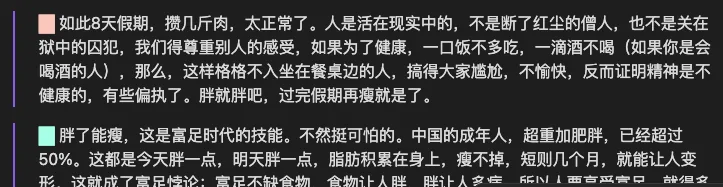
Template by Moy
- Name: Moy
- Author: Moy
- Link: Moy's post
---
title: "{{title}}"
url: {{url}}
created: {{createat}}
updated: {{updateat}}
noteid: {{noteid}}
star: {{isstar}}
highlights: {{highlightcount}}
tags: {{trimtags}}
obsidianUIMode: preview
---
# {{title}}
> [Read the source]({{ url }})
> [Open in WuCai]({{ wucaiurl }})
{% if pagenote %}
## Page note
{% block pagenote %}
> [!Review]
> {{pagenote | replace("\n", "\n> ") }}
{% endblock %}
{% endif %}
## Highlights
{% block highlights %}
{% for item in highlights %}
{% set colorSymbol %}◇ {% endset %}
{% set formattedHighlight %}
{% if item.imageUrl %}

{% else %}
<font color="{{ item.color }}">{{ colorSymbol }}</font> {{ item.note | trim | replace("\n", "\n> ") }}
{% endif %}
{% endset %}
{% if item.annonation %}
> [!Annotation]
> {{ formattedHighlight }}
> ^{{ item.refid }}
>
> {{ '---' }}
> 🦊 {{ item.annonation }}
{% else %}
> [!Highlight]
> {{ formattedHighlight }}
> ^{{ item.refid }}
{% endif %}
{% endfor %}
{% endblock %}
{% if mdcontent %}
{% block mdcontent %}
---
## Full-text clip %% fold %%
{{mdcontent}}
{% endblock %}
{% endif %}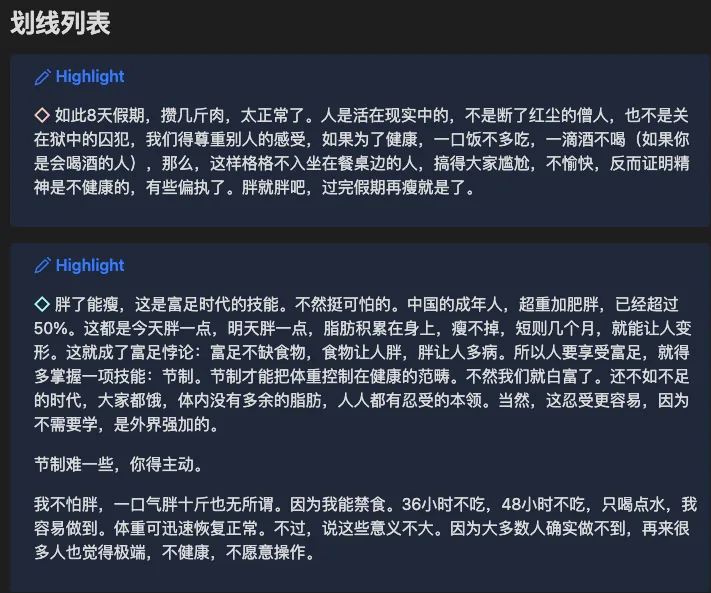
Write your own template
What a template contains
---
title: "{{title}}"
noteid: {{noteid}}
---

## {{title}}

## Highlights
{% block highlights %}
{% for item in highlights %}
{{ item | style1({prefix:"> ", anno:"> note: "}) }}
{% endfor %}
{% endblock %}
Three parts:
- the properties area — YAML frontmatter,
name: valueseparated by a colon - lines starting with
##— headings - a block named
highlights, which loops over every highlight and styles it with the built-instyle1function
Add a variable
Say you want the source URL in the properties area. That needs a variable. Variables come in four types:
string— textint— a number, such as a count or a timestampboolean— true or falselist— an array
The full list is in Obsidian sync.
The URL variable is , so:
---
title: "{{title}}"
noteid: {{noteid}}
source: "{{url}}"
---

## {{title}}

## Highlights
{% block highlights %}
{% for item in highlights %}
{{ item | style1({prefix:"> ", anno:"> note: "}) }}
{% endfor %}
{% endblock %}
Putting
into properties works differently, because a page note can contain line breaks — use theyaml_textfunction:
pagenote: {{pagenote | yaml_text}}Apply the template
Save it in the WuCai dashboard sync settings and it takes effect in Obsidian.
Template engine
WuCai uses nunjucks. The documentation is thorough; you mainly need if, for and functions.
Built-in functions
See template functions.