
SiYuan sync
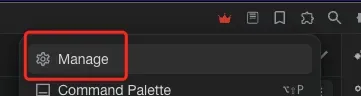
Click the manage button in the top-right corner of SiYuan and open the Marketplace.
Search for "五彩" (WuCai).
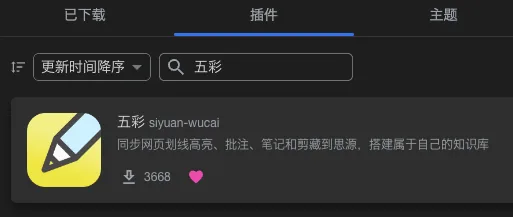
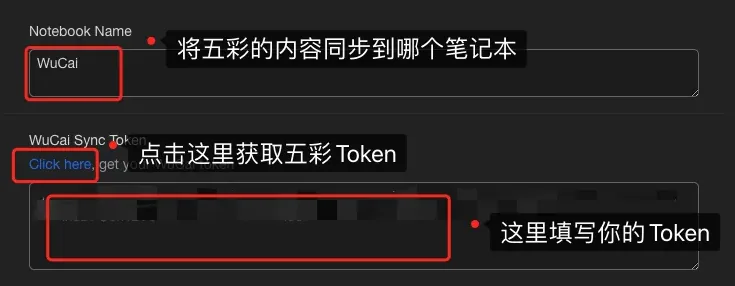
After installing, open the WuCai settings and paste your token.

You can find the token in the WuCai dashboard.
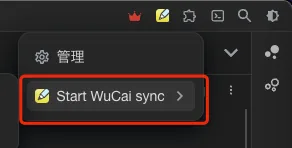
To sync, click the button in the top-right corner of SiYuan.
Template configuration
The default template:
jinja
## Page info
- Note type: {{notetype}} , starred: {{isstar}}
- Tags: {{alltags}}
{% if not isdailynote %}
- Author: {{author}} , domain: {{domain}} , domain2: {{domain2}}
{% endif %}
- [Source]({{url}}) , [WuCai]({{wucaiurl}})
- {{highlightcount}} highlights
- Created: {{createat}} , updated: {{updateat}}

{% if pagenote %}
## Page note
{{pagenote}}
{% endif %}

{% if isdailynote  %}
## Daily note
{{ highlights | style_dailynote }}
{% else %}
## Highlights
{% for item in highlights %}
{{ item | style1({prefix:"- ", anno:"\t - " }) }}
{% endfor %}
{% endif %}

{% if mdcontent %}
## Full-text clip
{{mdcontent}}
{% endif %}Variables for the body template
Variable names use lowercase with underscores, to keep mistakes rare. Copy them from here instead of typing them.
jinja
{{title}}           : page title (string)
{{url}}             : source URL (string)
{{wucaiurl}}        : WuCai link (string)
{{author}}          : author (string)
{{domain}}          : domain of the source URL (string), e.g. mp.weixin.qq.com
{{domain2}}         : second-level domain (string), e.g. qq.com
{{createat}}        : created at (string), e.g. 2023-02-08 21:03
{{createat_ts}}     : created at (timestamp, int)
{{updateat}}        : updated at (string), e.g. 2023-02-08 21:03
{{updateat_ts}}     : updated at (timestamp, int)
{{publishat_ts}}    : published at (timestamp, int)
{{noteid}}          : note id (string)
{{tags}}            : page tags (string)
{{alltags}}         : page tags + note tags (string)
{{pagenote}}        : page note (string)
{{isstar}}          : starred (boolean)
{{isdailynote}}     : is a Daily note (boolean); prefer notetype
{{notetype}}        : note type (string): page or dailynote
{{ispagemirror}}    : is a full-text clip (boolean)
{{highlightcount}}  : number of highlights (integer)
{{mdcontent}}       : full-text clip in markdown
{{highlights}}      : list of highlights
    {{item.type}}        : highlight type (string): highlight, image, math, quote
    {{item.refid}}       : highlight id (string)
    {{item.refurl}}      : link to the highlight (string)
    {{item.note}}        : highlighted text (string)
    {{item.imageurl}}    : image URL for image highlights (string)
    {{item.annotation}}  : annotation (string)
    {{item.color}}       : colour (string)
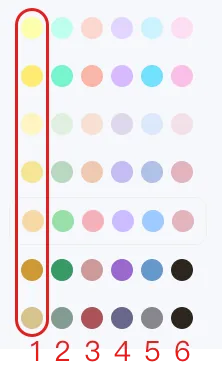
    {{item.slotid}}      : colour slot, 1~6
    {{item.updateat_ts}} : updated at (int)
    {{item.createat_ts}} : created at (int)
    {{item.tags}}        : highlight tags, e.g. #read #todo
slotid has six values, mapping to six colours. WuCai ships several colour themes, and the same slot id maps to a similar colour in every theme:
Variables for the title
jinja
{{title}}       : title (string)
{{createat_ts}} : timestamp (integer)
{{domain}}      : domain of the page (string)
{{domain2}}     : second-level domain (string)
{{notetype}}    : document type (string): dailynote or page
{{isdailynote}} : is a Daily note (boolean)
Templates are rendered by nunjucks. More template syntax