
Logseq sync
Search for wucai in the Logseq marketplace and install the plugin.
How templates work
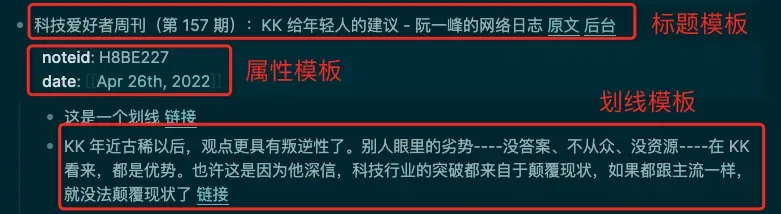
A note is rendered from three templates: the page title template, the property template and the highlight template (used for both highlights and their notes).
The three red boxes below together render one page.
Editing the templates
Open the sync settings in the WuCai dashboard. There are three inputs: page title template, property template and highlight template.
A few details:
- Property syntax is
name:: value— an English double colon followed by a space. - The highlight template should not contain line breaks.
- The Logseq template engine does not support functions.
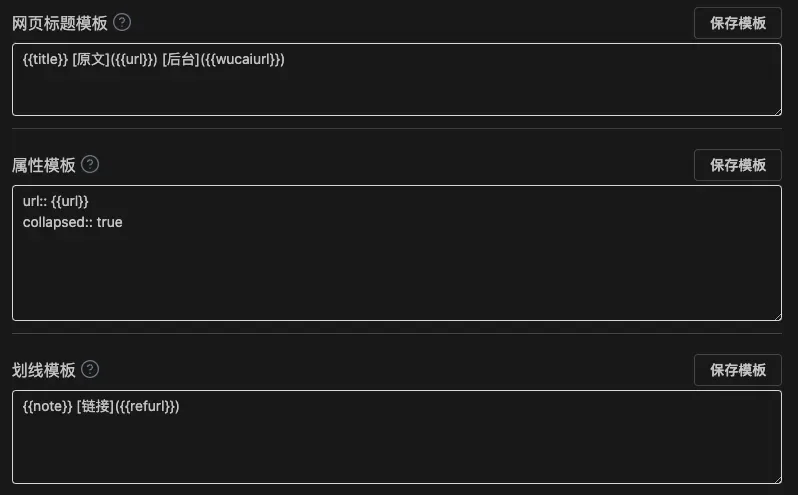
The available variables differ between inputs; see below.
Title template variables
A minimal format:
{{title}} [source]({{url}}) [dashboard]({{wucaiurl}})Full list:
{{title}} string page title
{{url}} string source URL
{{wucaiurl}} string WuCai link
{{tags}} string, e.g. #reading #travel (>= 24.5.3)
{{trimtags}} string, e.g. reading, travel (>= 24.5.3)
Property template variables
Copy variable names from here rather than typing them, to avoid typos. The sync plugin adds a noteid property automatically; if you do not want to see it, hide it as described above.
A minimal format:
createat:: {{createat}}
collapsed:: true
Full list:
{{pagenote}} string page note
{{wucaiurl}} string WuCai dashboard link
{{url}} string page URL
{{noteid}} string note id
{{tags}} string, e.g. #reading #travel (>= 24.5.3)
{{trimtags}} string, e.g. reading, travel (>= 24.5.3)
{{createat}} string, created at, e.g. 2023-10-21 22:23
{{updateat}} string, updated at, e.g. 2023-10-21 22:23
The property template accepts custom settings too. To make Logseq collapse the block automatically:
url:: {{url}}
wucaiurl:: {{wucaiurl}}
note:: {{pagenote}}
collapsed:: true
The last line, collapsed:: true, is what collapses the block.
Highlight template variables
A minimal highlight template:
{{note}} [link]({{refurl}})Available variables:
{{note}}   string the highlighted text
{{refid}}  string highlight id
{{refurl}} string link to the highlight, may be empty
{{slotid}} int colour slot id, 1~6
{{color}}  string colour value, e.g. #F9CB7F
{{tags}}   string highlight tags, e.g. #read #history (>= 24.7.15)