Remove the ID at the end of Obsidian file names
When syncing to Obsidian, versions before 24.10.24 appended an identifier to the file name, for example:
三十二个有用的思维模型-H89FAME.md
Three steps remove it:
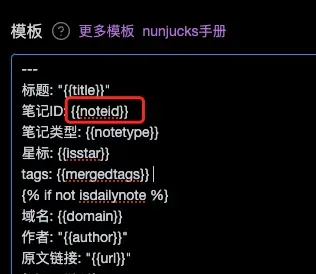
- Check the Obsidian template in the WuCai dashboard and make sure it contains the
noteidproperty - Update the WuCai Obsidian plugin to 24.10.24
- Rename the files that were already synced, using the migrate command
1. Check the template
Make sure the variable sits in the property area (YAML frontmatter), for example:
(The property name does not matter — the plugin detects it. This example uses "笔记ID".)
2. Update the plugin
Update from the Obsidian plugin marketplace, or download it from the WuCai Baidu Netdisk mirror.
3. Migrate existing file names
Run the migrate command from WuCai.
It usually finishes quickly; with many files it takes a while.